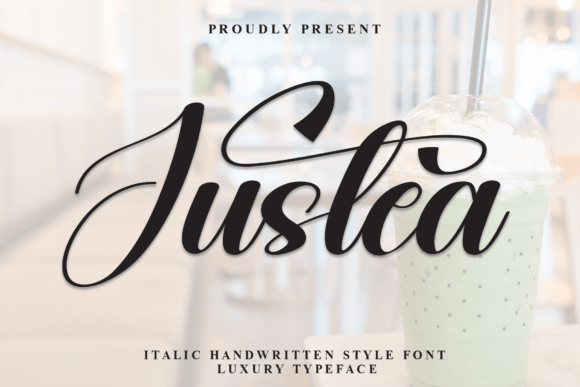
Justea: A Handwritten Font That Breathes Life Into Your Creations
Where Can You Use Justea?
Handmade Labels: Justea works beautifully on candle labels, product tags, and boutique packaging. It adds a personal feel that customers love. I’ve used it on small stickers and labels for my handmade soap and candles, and it always gets positive feedback.
Greeting Cards and Invitations: For my handmade greeting cards and wedding invitations, Justea brings a level of sophistication and warmth that feels genuine. It’s especially great for names, titles, and decorative phrases.
Wall Art and Planner Pages: I've also used Justea in my printable wall art and planner pages. It looks stunning in larger formats and can be paired with clean sans serif fonts for contrast and balance.
Digital Printables and Templates: Justea is a favorite for digital downloads too. It looks great in mockups and previews, and it's easy to pair with other fonts for a cohesive design.
How Does Justea Enhance Your Brand?
Using Justea helps create a consistent brand identity. It’s not just about how your text looks—it’s about how it makes your audience feel. The font adds an emotional appeal that can make your products more relatable and memorable.
Customers often comment on the “handmade” feel of my products, and I believe that’s partly due to the use of Justea. It gives your designs a sense of authenticity and care, which is essential for building trust and loyalty with your audience.
Font Pairing Tips
When pairing Justea with other fonts, consider the following:
- Clean Sans Serif: Pair Justea with a simple sans serif font like Montserrat or Open Sans for a modern and balanced look.
- Simple Serif: A classic serif font like Georgia or Cinzel can complement Justea’s flow with a touch of elegance.
- Script Font: If you want a more cohesive script look, try pairing Justea with another script font like Great Vibes or Pacifico.
- Bold Display Font: For a striking contrast, use a bold display font like Bebas Neue alongside Justea.
Readability and Practical Tips
While Justea is beautiful, it’s important to consider readability, especially when using it on small stickers or product labels. Test your designs on actual materials before printing. Also, ensure that your text is clear and legible, even at smaller sizes.
If you’re using Justea for digital templates or mockups, make sure the font files are properly embedded and that your previews look as intended. This will help you present your designs accurately to potential buyers or customers.
What to Look For in Justea
Before using Justea for commercial purposes, check the included styles, alternates, ligatures, swashes, weights, file formats, multilingual support, and licensing details. These factors can affect how you use the font in different projects.
Justea is available in multiple formats, including OTF and TTF, making it compatible with most design software. It also supports various languages, which is great if you're targeting an international audience.
Real-World Examples
I recently used Justea on a set of farmhouse-style signs for a local market. The font added a warm, inviting feel that matched the rustic theme perfectly. I also created a series of birthday invitations using Justea, and they were a hit with customers who loved the personal touch.
For my digital printables, I paired Justea with a clean sans serif font to create a modern yet charming aesthetic. The result was a collection of printable wall art that sold quickly and received many positive reviews.
Final Thoughts
Justea is more than a font—it’s a tool that brings creativity to life. Whether you're designing handmade labels, greeting cards, or digital templates, it adds a unique charm that elevates your work. With its versatility and elegance, Justea is a must-have for any creative maker or designer looking to make their mark in the world of handmade and digital craft.